

Interactive Query
Query JSON without leaving the viewer. Press ., type a query, and watch the result update as you type. Press enter to apply it, or esc to return to the original JSON.
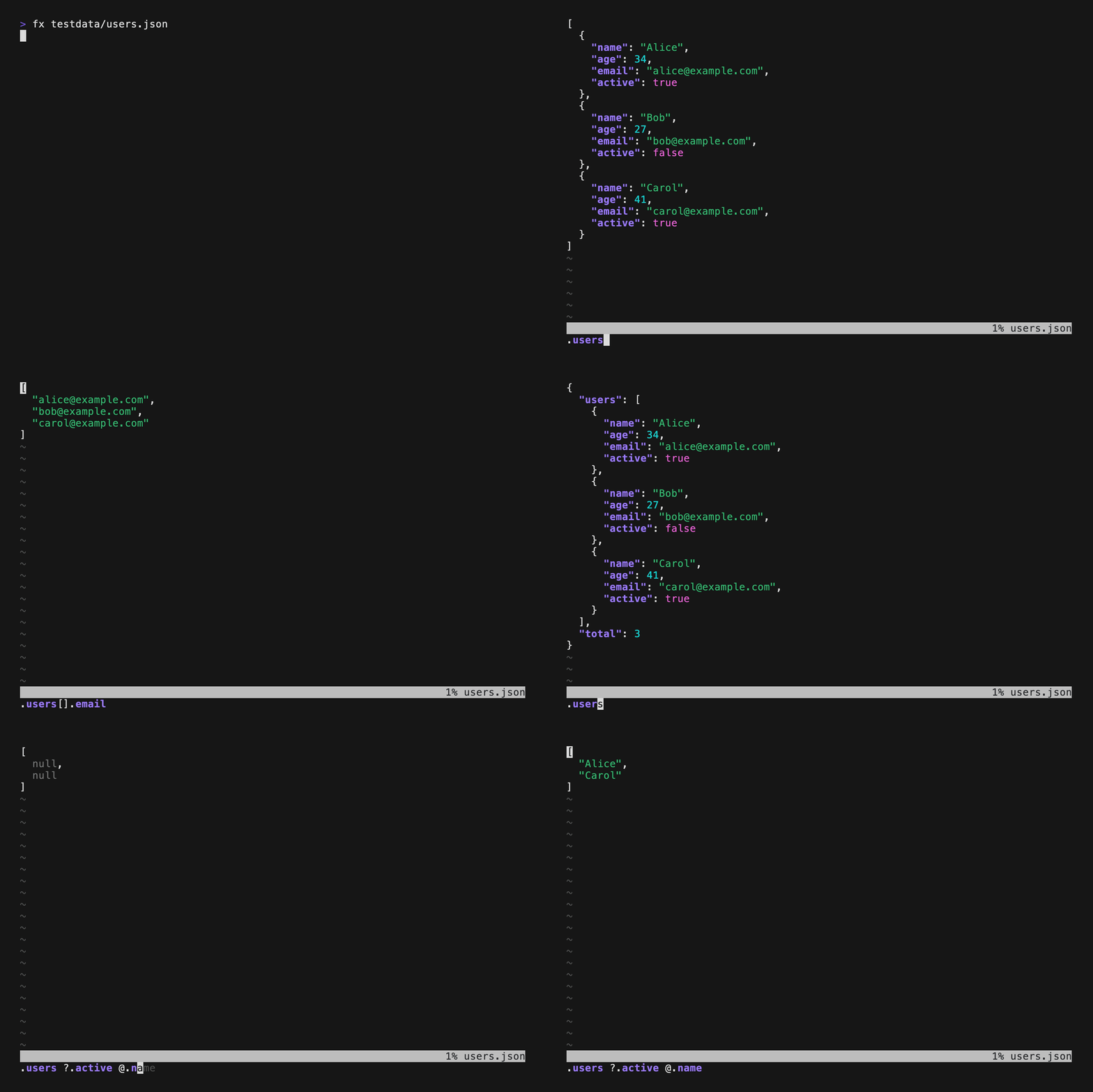
The examples use this users.json:
{
  "users": [
    {"name": "Alice", "age": 34, "email": "alice@example.com", "active": true},
    {"name": "Bob", "age": 27, "email": "bob@example.com", "active": false},
    {"name": "Carol", "age": 41, "email": "carol@example.com", "active": true}
  ],
  "total": 3
}
Open the Query Input
Open the file in the viewer:
fx users.jsonPress .. Fx opens the query input at the bottom of the screen with . already typed. Type the rest of the query and press enter.
| Key(s) | Action |
|---|---|
| enter | apply the query |
| esc | cancel and restore the original |
| tab / shift+tab | complete, cycle through candidates |
| →, end, ctrl+e | accept the suggestion |
| ↑ / ↓ | browse query history |
Write a Query
Queries use the same language as the command line. Every argument you can pass to fx in the shell works in the query input:
| Query | Result |
|---|---|
.users[0].name | "Alice" |
.users[].name | ["Alice", "Bob", "Carol"] |
.users @.name | the same, @ maps over the array |
.users ?.active | only Alice and Carol, ? filters the array |
.users.length | 3, any JavaScript works |
x => x.users.length | 3, x is the input |
.users len | 3, with a built-in function |
Separate piped queries with a space. Each query receives the result of the previous one:
.users ?.active @.email[
"alice@example.com",
"carol@example.com"
]Fx keeps JavaScript expressions together, so spaces around operators, arrows, and inside brackets or strings do not split a query. .users.filter(x => x.age > 30) @.name runs as two steps: the filter, then the map.
Functions from your .fxrc.js work here too.
Complete Keys as You Type
Fx knows the keys of your JSON and suggests them as you type. The suggestion appears dimmed after the cursor:
- Type
.uand fx suggests.users. Press tab, →, or keep typing. - Type
.users[].and press tab. Fx lists every key of the users above the input and inserts the first one. Press tab again to cycle forward and shift+tab to cycle back. - Type
.users.on an array and press tab. Fx inserts.users[].name, so the query maps over the array.
Completion also works after @. and ?., and inside arrow functions such as .users.map(x => x..
Preview the Result Live
Fx runs the query on every keystroke and shows the result right away, so you see whether the query does what you mean before you press enter. A query that fails, or returns null, leaves the last good result on screen.
The live preview runs only once the whole input is loaded and for inputs up to 10,000 lines. On larger inputs, press enter to run the query.
Apply and Explore
Press enter to apply the query. The result replaces the tree, and the query stays visible at the bottom. Everything you can do with the original works on the result: navigate, collapse, search with /, preview with p, and copy with y.
To change the query, press . again. The input reopens with the current query, and you can edit it, or press ↑ to bring back an earlier query.
To return to the original JSON, press . and then esc.
Save the Result
Press : to open the command line and write the result to a file:
:w active-users.json:w without a file name overwrites the input file. Fx asks for confirmation first; :w! skips it. :wq writes and quits.
To print a value to stdout instead, move to it and press P. Fx draws the interface on stderr, so redirect stdout to a file:
fx users.json > result.jsonQuery a Stream
JSON Lines and concatenated JSON work as on the command line: fx runs the query on every document, and results appear as documents arrive, even while the input is still loading. The live preview waits until the input is complete.
Errors
Fx shows errors in the result view. Output of console.log and println shows up there too.
exit() is not available in interactive mode. To save the result, use :w.
TIP
Press ? to see the query syntax and keys inside fx.